 AmilForge
Clan Boss Rewards Tracker: Log Your Shard and Book Income
By AmilForge · Updated May 2026 · 8 min read
What the CB Rewards Tracker actually does
The CB Rewards Tracker in Raid Companion is a daily log for the shards and books you receive from Clan Boss chests. Every time you open a Clan Boss chest and receive Ancient Shards, Void Shards, Sacred Shards, Epic Books, or Legendary Books — you log them here. Over time, the tracker builds a complete picture of your Clan Boss income: monthly totals, daily averages, and a 6-month history chart.
This is fundamentally different from tracking your damage output or chest tier. The CB Rewards Tracker answers a different question: how many shards and books am I actually getting from Clan Boss each month? That number matters more than most players realise — Clan Boss is often the most consistent source of Ancient and Void shards outside of events, and without tracking it you have no real sense of your income rate.
The five reward types you track
| Reward Type | Why it matters |
|---|---|
| Ancient Shards | Primary summoning resource; feeds your mercy counter |
| Void Shards | Rarer and more valuable; Void-exclusive champion pool |
| Sacred Shards | Highest value; drops infrequently even at top tiers |
| Epic Books | Used to skill-up Epic champions without farming |
| Legendary Books | Most scarce resource; critical for end-game champion development |
Tracking all five gives you an honest monthly income number for your most valuable resources — not a vague sense that "CB pays out well."
Inside the tracker: every control explained
Calendar (left panel)
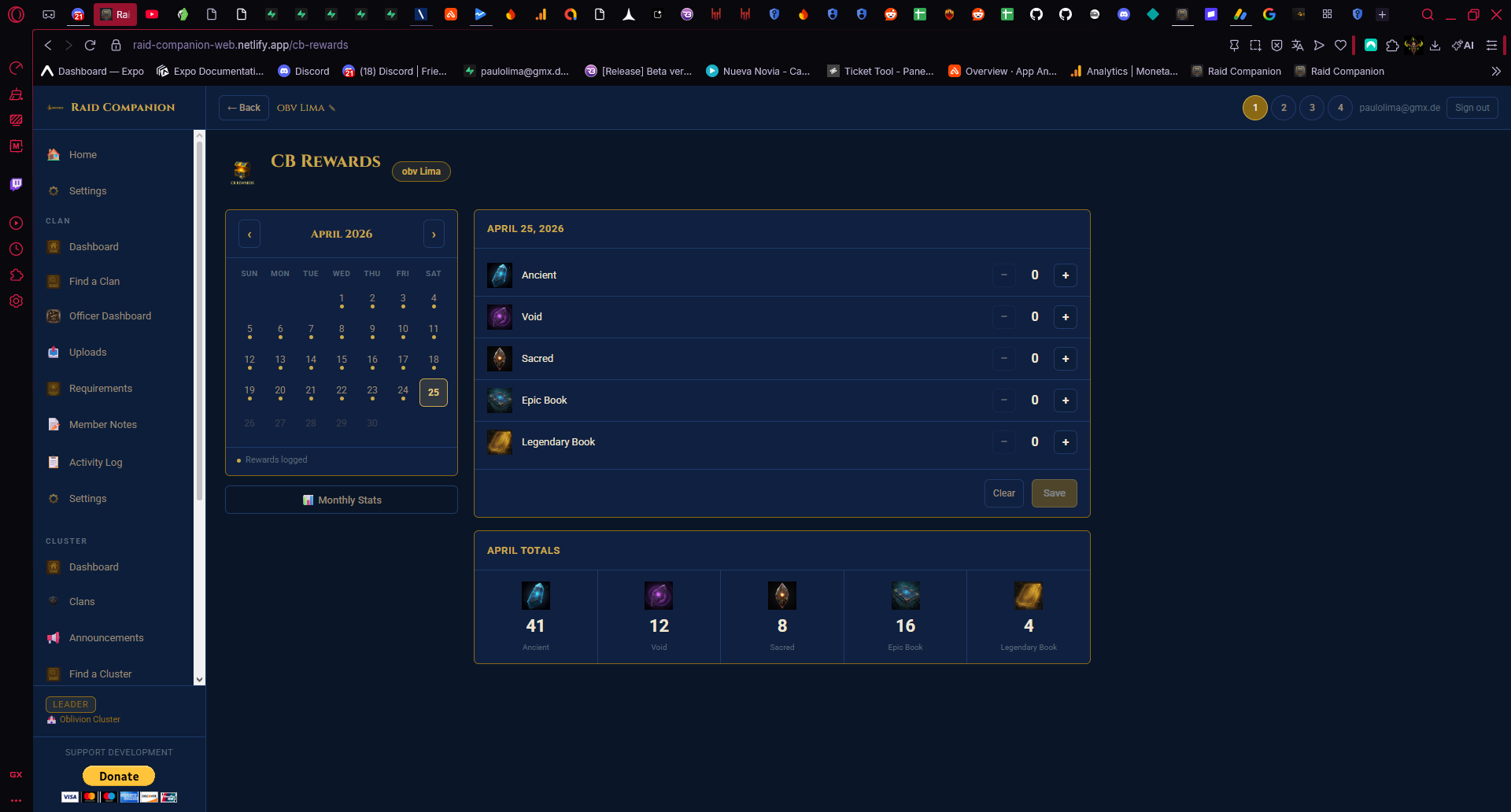
The calendar displays the full current month in a grid. Navigation arrows (◀ ▶) let you move between months to review or edit past entries. Click any day to select it and log rewards for that date. Days where you have already saved data show a small dot indicator so you can see at a glance which days are filled in. A "Rewards logged" label appears below the calendar when the selected day has saved data.
Daily Reward Entry (right panel)
After selecting a day, five reward rows appear — one for each reward type. Each row has a minus (—) button and a plus (+) button to set the exact quantity you received. Then:
- Clear button — wipes all values for that day back to 0 if you made an error
- Save button — saves the entry for that day permanently
The entry is per-day, so if your chest paid out across two days in a week you log them separately. This gives the monthly totals accurate data to work from.
Monthly Totals Panel (bottom of calendar)
Below the calendar you always see running totals for the entire current month — automatically summed from all daily entries, displayed with icons for each type: Ancient, Void, Sacred, Epic Book, Legendary Book. You don't need to open anything to see this — it's always visible.
Monthly Stats popup
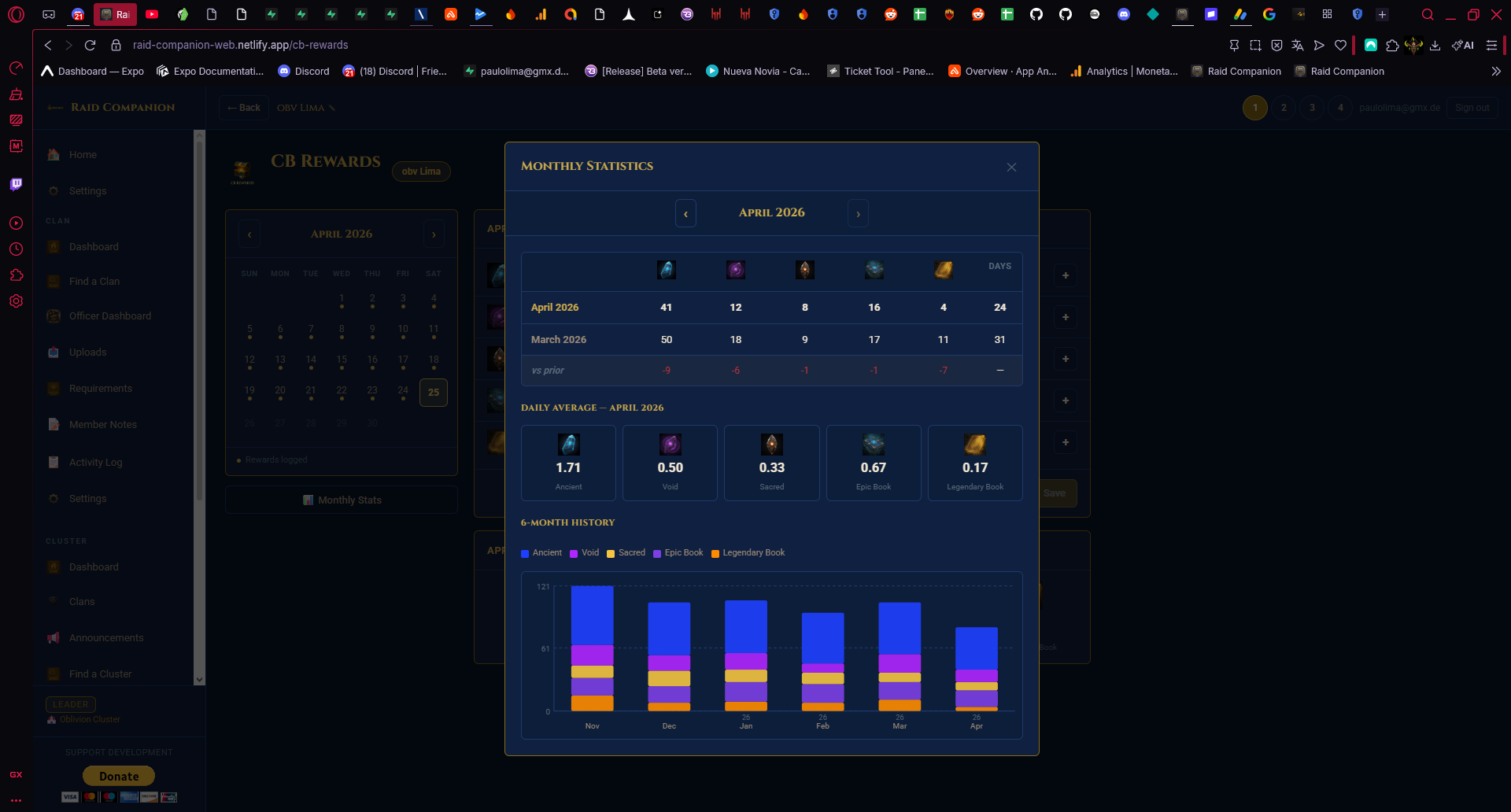
Click the Monthly Stats button (bottom of the calendar) to open the detailed statistics view. This contains three sections:
- Comparison table — a side-by-side view of this month vs last month vs the difference between them, for all five reward types plus total days logged. Immediately shows whether your CB income is trending up or down.
- Daily Average section — shows your average per day for the current month (e.g. 1.58 Ancient/day, 0.53 Void/day). This is the number to watch if you're planning how long it will take to save a target number of shards.
- 6-Month History chart — a stacked bar chart showing your totals for the last six months, colour-coded by reward type. Great for spotting long-term trends: which months were good CB months, whether Sacred shard drops are increasing, and how your daily average has shifted as your account progressed to higher difficulty tiers.
Why the 6-month chart matters: Most players upgrade their Clan Boss difficulty tier every few months as their account grows. The chart lets you see the direct impact on shard income — a clear visual jump in Ancient shard totals after moving from Hard to Nightmare is exactly the kind of signal that confirms the effort of building a stronger CB team was worth it.
How to build a consistent logging habit
The tracker is only as useful as the data you put into it. A few habits that make it accurate:
- Log immediately after opening chests. It takes 15 seconds — doing it later means you'll forget the exact quantities, especially for smaller drops like single books.
- Log even zero days. If you opened your chest and received nothing notable (no shards, no books), log the day with all zeroes. This keeps your daily average honest — a month that looks like "18 Ancient shards" but only has 12 days logged is misleading.
- Use the calendar dots as a visual checklist. At the end of each week, glance at the calendar. Any day without a dot that should have one means a missed log entry — you can often recall what you received if you check within a day or two.
- Review the comparison table monthly. At each month reset, open Monthly Stats and note the trend. If your Ancient shard income dropped significantly, investigate why — it might signal that you missed several days of CB or that your chest tier dropped.
Using CB income data to plan pulls
Once you have two or three months of data, you can make accurate forward projections. If your daily average is 1.5 Ancient shards per day and you want to accumulate 90 Ancient shards before a banner you want, you know you need roughly 60 days of consistent CB participation — giving you a concrete timeline rather than a vague "save shards" intention.
Combine this with your current mercy position from the Mercy Tracker and you get a full picture: how many shards you'll have in 60 days, and how many pulls remain until your next guaranteed Legendary from your current pity position.
What the tracker doesn't do
The CB Rewards Tracker logs what you receive from chests — it doesn't track your damage output, your chest tier, or your key usage. If you want to understand why your CB income changed (e.g. you moved up a difficulty tier and are now getting more shards), that context needs to come from your own notes. The tracker records outcomes; the decisions behind those outcomes are yours.
Start logging your CB rewards
The CB Rewards Tracker is free in Raid Companion on Android and at app.amilforge.com. The first month of data is the hardest part — after that, the monthly comparisons and 6-month chart start giving you genuinely useful insight into your account's passive income.