 AmilForge
CvC Calculator: Maximize Your Clan vs Clan Points
By AmilForge · Updated May 2026 · 9 min read
What is Clan vs Clan (CvC)?
Clan vs Clan is a recurring competitive event in RAID Shadow Legends where two clans are matched against each other and compete for the highest combined point total across a wide range of in-game activities. Points are earned across 15 objective categories — from running dungeons and fighting the Demon Lord, to Forge crafting, Arena battles, and gear upgrades.
The winning clan earns better rewards for all its members, and individual players earn personal milestone rewards based on their own contribution. This dual reward structure makes CvC one of the most impactful recurring events in the game — hitting your personal milestones and helping the clan win both matter.
Inside the CvC Calculator: the full interface
The CvC Calculator in Raid Companion is built to show your running total at all times without requiring any manual arithmetic. Here's every control:
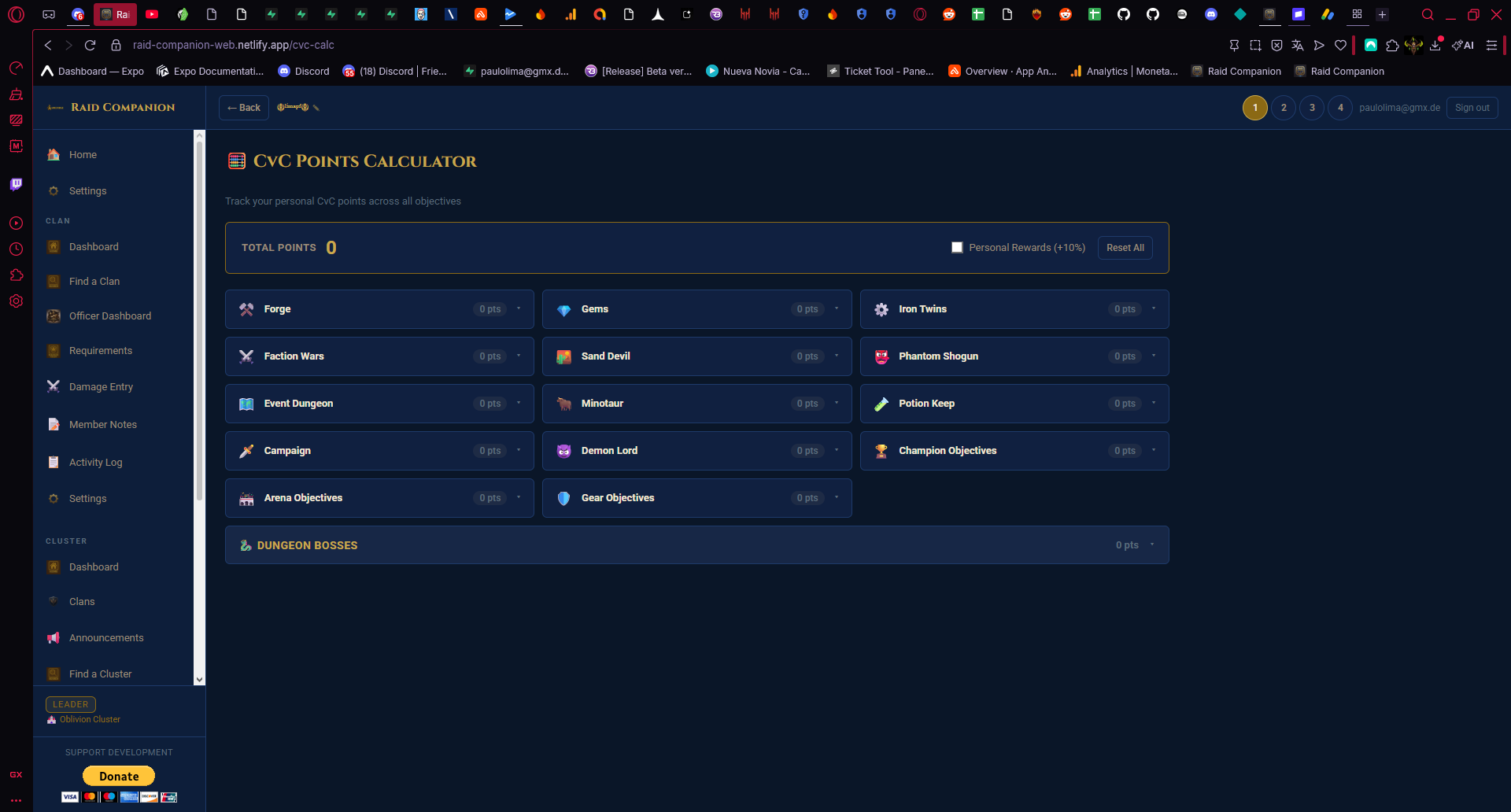
Total Points Counter
A large live counter sits at the top left of the screen. It updates automatically every time you change a value in any objective tile — you always know your running personal total without doing any math.
Personal Rewards (+10%) Toggle
A checkbox in the top right adds a 10% bonus to your displayed total. Enable this during Personal Rewards weeks so your score reflects the actual boosted point values that week. Forgetting to toggle this on during a PR week means your projected totals will be understated.
Reset All Button
Clears every objective field back to 0 in one click. Use this at the start of each new CvC to begin with a clean slate rather than carrying over last event's values.
All 15 CvC objective categories
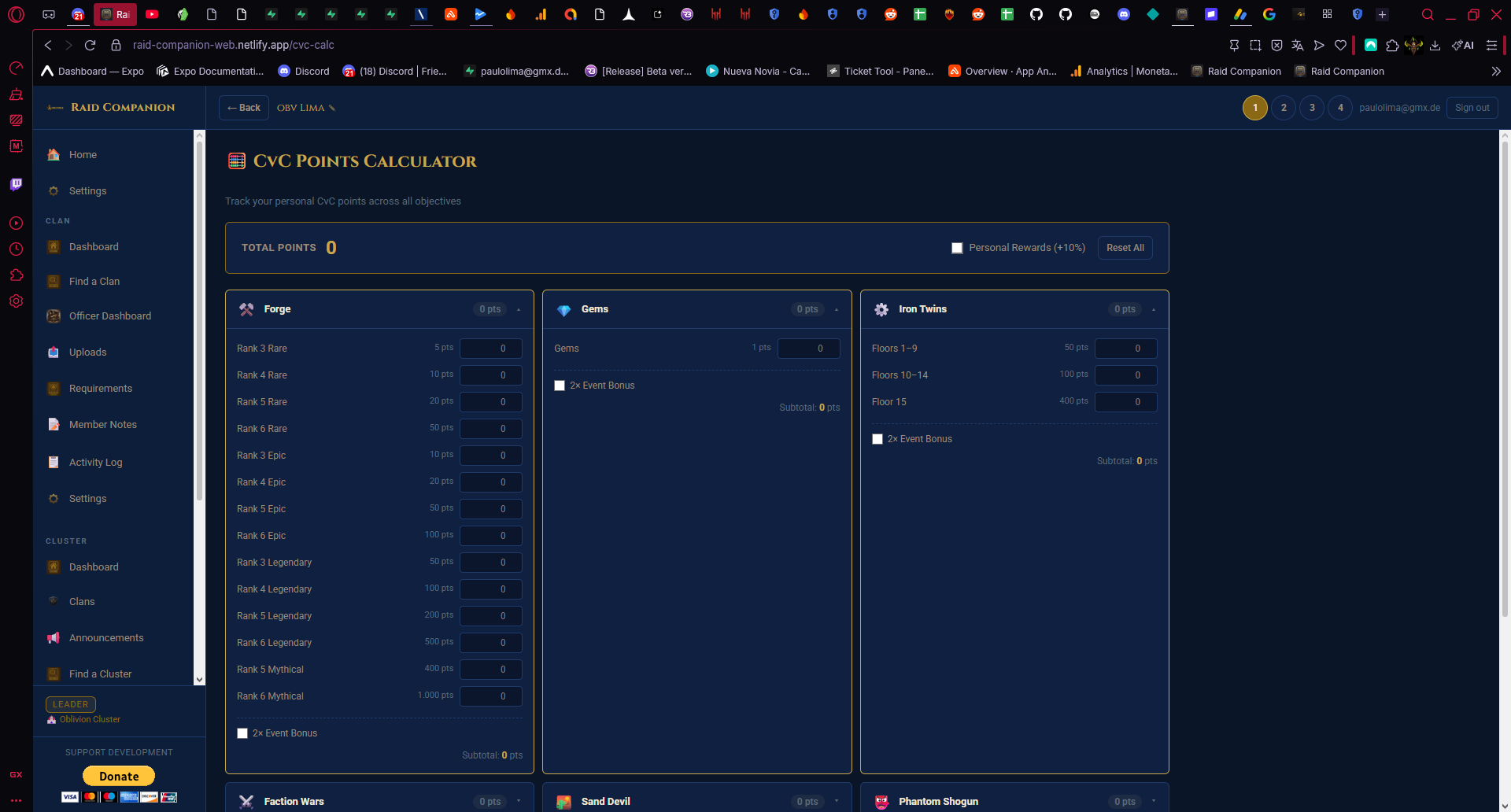
Every objective in the CvC event is represented as an expandable tile. Click the expand arrow (▼) on any tile to enter your point value for that category. The total updates live as you type. The 15 categories are:
| Category | What counts |
|---|---|
| Forge | Crafting gear in the Forge |
| Gems | Spending gems on in-game actions |
| Iron Twins | Completing Iron Twins Fortress runs |
| Faction Wars | Running Faction Wars stages |
| Sand Devil | Sand Devil Necropolis runs |
| Phantom Shogun | Phantom Shogun fights |
| Event Dungeon | The rotating weekly event dungeon |
| Minotaur | Minotaur's Labyrinth runs |
| Potion Keep | Potion Keep farming |
| Campaign | Campaign stage completions |
| Demon Lord | Clan Boss key usage and damage |
| Champion Objectives | Levelling, ranking, ascending champions |
| Arena Objectives | Arena fight completions |
| Gear Objectives | Upgrading and enchanting artifacts |
| Dungeon Bosses | Dragon, Spider, Ice Golem, Fire Knight, etc. |
Simply expand each category you've completed or plan to complete, enter your points, and watch the total update at the top. You don't need to fill in categories you won't contribute to — leave them collapsed at 0.
How to use the calculator effectively
- At the start of CvC — click Reset All and enter the activities you plan to complete over the event window. Check whether your projected total hits your personal milestone target. If not, identify which additional category closes the gap most efficiently.
- Mid-event check-in — enter what you've done so far and see where your running total stands. This is especially useful if you're trying to hit a milestone before the event closes.
- Personal Rewards weeks — enable the +10% toggle immediately. Your plan needs to account for the boost, and the calculator will reflect the correct boosted totals.
- Share your target with clanmates — if every member knows the individual point target needed for the clan to win, the collective total becomes predictable. The calculator makes it easy for each player to self-check without asking in clan chat.
Clan leader tip: The Officer Dashboard in Raid Companion lets you track which members are hitting their CvC contribution targets. Combine that with each player using the CvC Calculator to self-plan, and you eliminate the guesswork entirely.
CvC strategy: getting the most from your resources
A few principles that apply across almost every CvC event:
- Never skip Demon Lord (Clan Boss) during CvC. CB keys regenerate daily and using them contributes points in one of the most reliable categories. Missing keys is leaving free points on the table.
- Save resource-spending actions for CvC windows. Gear upgrades, champion ascensions, Forge crafting, and gem spending earn the same CvC points whenever you do them. Deferring these to an active CvC event is essentially free points with no extra cost.
- Don't ignore smaller categories. Categories like Arena Objectives and Potion Keep are easy to overlook but contribute steadily across a 3-day event window. A few extra Arena runs per day add up.
- Spread your contributions. Relying on a single category (e.g. all points from Dungeon Bosses) makes your total vulnerable if that category has a bad week or you run out of energy. The 15-category structure is an opportunity to diversify.
Raid Companion vs Clan vs Clan spreadsheets
Many players track CvC points using spreadsheets. The CvC Calculator replaces that entirely — no setup, no formula management, no risk of breaking something by typing in the wrong cell. The live total updates instantly, the categories are always current, and the PR toggle handles the weekly bonus automatically. It works on any device in a browser, so you can check your standing from your phone mid-session without opening a separate file.
Start planning with the CvC Calculator
The CvC Calculator is completely free in Raid Companion. Enter your planned activities, see your projected points instantly, and go into every CvC event knowing exactly where you stand before the first objective is completed.