 AmilForge
Understanding the RAID Shadow Legends Mercy System
By AmilForge · Updated May 2026 · 9 min read
What is the mercy system?
The mercy system — also called the pity system — is a mechanic in RAID Shadow Legends that guarantees you will receive a Legendary champion after a set number of pulls without one. It exists to prevent players from spending enormous amounts of resources on shards without ever receiving a high-rarity reward.
Without mercy, pulling shards is purely random within fixed drop rate percentages. The mercy system adds a hard floor: no matter how unlucky you are, you will eventually receive a Legendary once your counter reaches the pity cap for that shard type.
Understanding mercy is essential for deciding when to pull, how many shards to save, and whether chasing a specific fusion or event champion is realistic given your current stockpile.
How mercy works in RAID
Every time you open a shard and do not receive a Legendary champion, your mercy counter for that shard type increases by one. When the counter reaches the pity cap, your next pull is guaranteed to be a Legendary. After receiving a Legendary, your counter resets to zero.
Mercy counters are tracked independently per shard type. RAID Shadow Legends currently has six shard types, each with its own counter. Pulling Ancient shards does not affect your Void counter, and so on.
Counters persist through updates, events, and time. They do not reset between banners or at the end of events. If you were at pity 140 on Ancient shards when a new fusion event starts, you carry that 140 into the new event.
All six shard types and their trackers
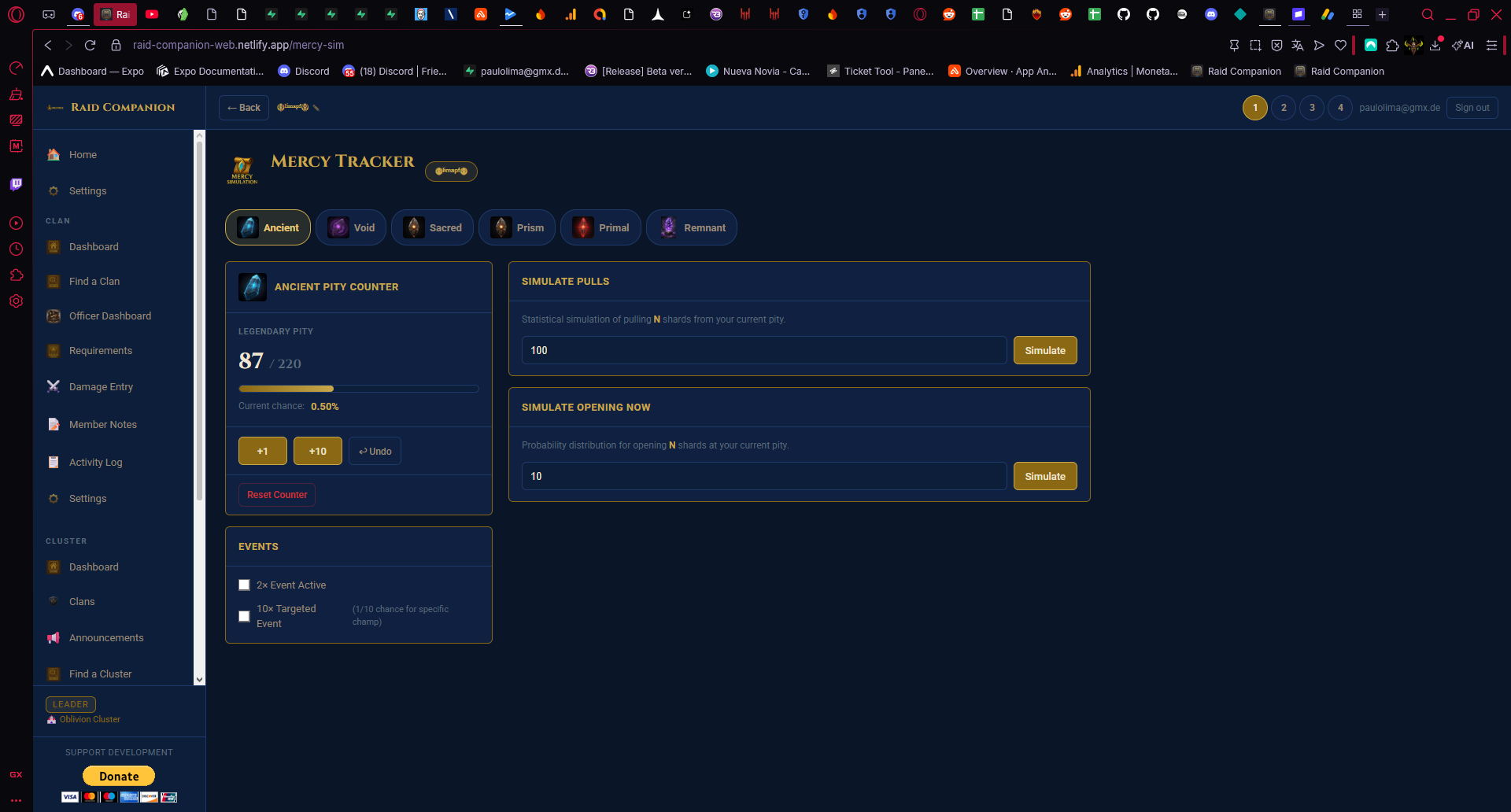
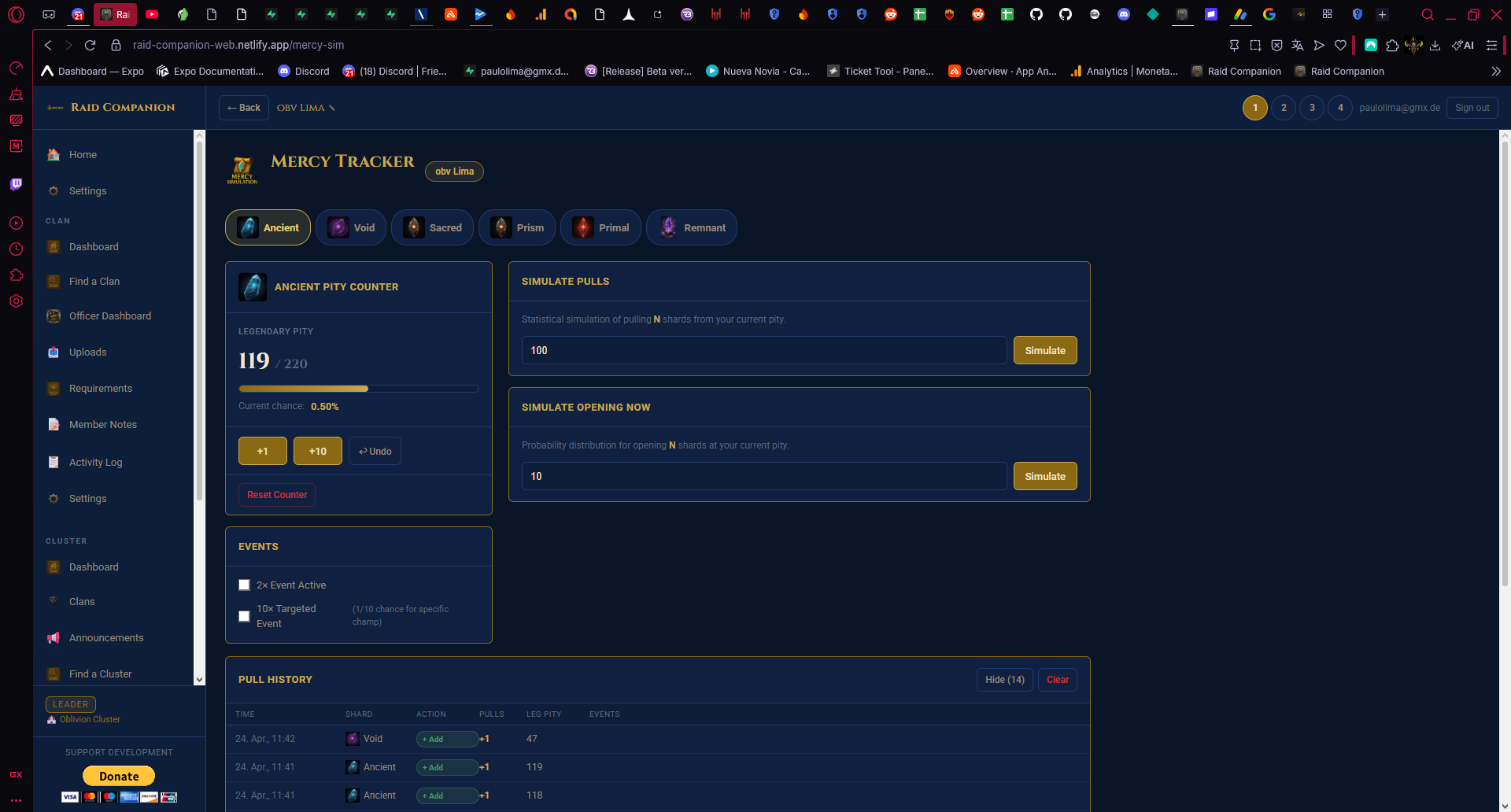
The Mercy Tracker in Raid Companion supports all six shard types with independent counters. You switch between them using tabs at the top of the tracker:
| Shard Type | Counter | Notes |
|---|---|---|
| Ancient | Independent | Most common shard type, broad Legendary pool |
| Void | Independent | Void-exclusive champion pool |
| Sacred | Independent | Low pity cap, Legendary-focused loot table |
| Prism | Independent | Newer shard type |
| Primal | Independent | Newer shard type |
| Remnant | Independent | Newer shard type |
Each tab shows its own pity counter, progress bar, and simulate panels — completely isolated from the others. Switching tabs never resets your progress.
Why you must track mercy manually
RAID Shadow Legends does not display your current mercy counter anywhere in the game interface. There is no in-game screen that tells you how many pulls you've made since your last Legendary on any shard type. The only way to know your count is to track it yourself from the beginning.
This is a significant gap. If you don't know your pity position, you can't make informed decisions. You might hold shards unnecessarily when you're 20 pulls away from a guaranteed Legendary, or spend a large stockpile not realising your counter reset and you're starting from zero.
Inside the Mercy Tracker: all the controls
The Mercy Tracker in Raid Companion is built around two panels:
Pity Counter Panel (left)
This is your live counter for the selected shard type:
- Legendary Pity display — shows your current count vs the pity cap (e.g. 87 / 220) with a progress bar that fills as you approach the guarantee.
- Current chance % — your live probability of receiving a Legendary on the very next pull, based on your current pity position.
- +1 button — adds one pull. Tap this after every single shard you open.
- +10 button — adds ten pulls at once. Use this when you open a 10-pack.
- Undo button (↩) — removes the last entry if you made a mistake.
- Reset Counter button — resets your pity back to 0 after you receive a Legendary.
Simulate Panels (right)
Two separate simulate tools let you plan ahead without affecting your live counter:
- Simulate Pulls — enter any number of shards (e.g. 100) and click Simulate. The app calculates the statistical probability of pulling at least one Legendary from that many shards, starting from your current pity position. Use this to decide whether your stockpile is large enough to pull on a banner.
- Simulate Opening Now — enter the exact number of shards you are about to open (e.g. 10) and see a probability distribution of outcomes for that specific session. Helps you set realistic expectations before you start pulling.
Event Toggles (bottom left)
Two checkboxes that adjust your drop rate calculations when special events are active:
- 2x Event Active — doubles Legendary drop chances. Check this during double-rate events so your simulated odds reflect the boosted rates.
- 10x Targeted Event — activates the 1-in-10 chance mechanic for a specific champion. Check this during targeted champion events.
Tip: The best time to start tracking is right after receiving a Legendary — your counter resets to zero, giving you a clean, confident starting point for every shard type you track.
Strategic use of mercy for events and fusions
Knowing your pity position becomes especially important during fusion events, where you need to pull specific champions within a fixed window. If you're at pity 170 on Ancient shards, you know a guaranteed Legendary is very close — which changes whether it makes sense to hold those shards for the fusion or spend them now.
For Sacred shards, the low pity cap means you should rarely sit on them when a useful Sacred Legendary is available. The math strongly favours pulling sooner rather than hoarding.
The 2x and 10x event toggles in the simulator are particularly useful during special banners. When a targeted event is active, enabling the 10x toggle in the simulator shows you the realistic odds of hitting that specific champion from your available shards — not just any Legendary.
Common mercy tracking mistakes
- Forgetting to log pulls immediately. Skipping even one session makes your counter inaccurate. Log right after each pull session.
- Mixing up shard types. All six types have independent counters. Always confirm you're on the correct tab before logging.
- Not resetting after a Legendary. When you receive a Legendary, tap Reset Counter in the tracker. If you're batch-pulling and land a Legendary mid-session, reset and then continue counting from zero for the remaining shards in that session.
- Not enabling event toggles during boosted events. Simulating without the 2x toggle during a double-rate event will give you inaccurate probability estimates — the real odds are better than what the standard simulation shows.
Get started with the Mercy Tracker
The Mercy Tracker is available free in Raid Companion on Android and at app.amilforge.com. No game login required — you enter your data manually and the tracker handles all the calculations.